If your API pages aren’t displaying correctly, check these common configuration issues.
In this scenario, it’s likely that either Mintlify cannot find your OpenAPI document, or your OpenAPI document is invalid.Running mint dev locally should reveal some of these issues.To verify your OpenAPI document will pass validation:
  1. Visit this validator
  2. Switch to the “Validate text” tab
  3. Paste in your OpenAPI document
  4. Click “Validate it!”
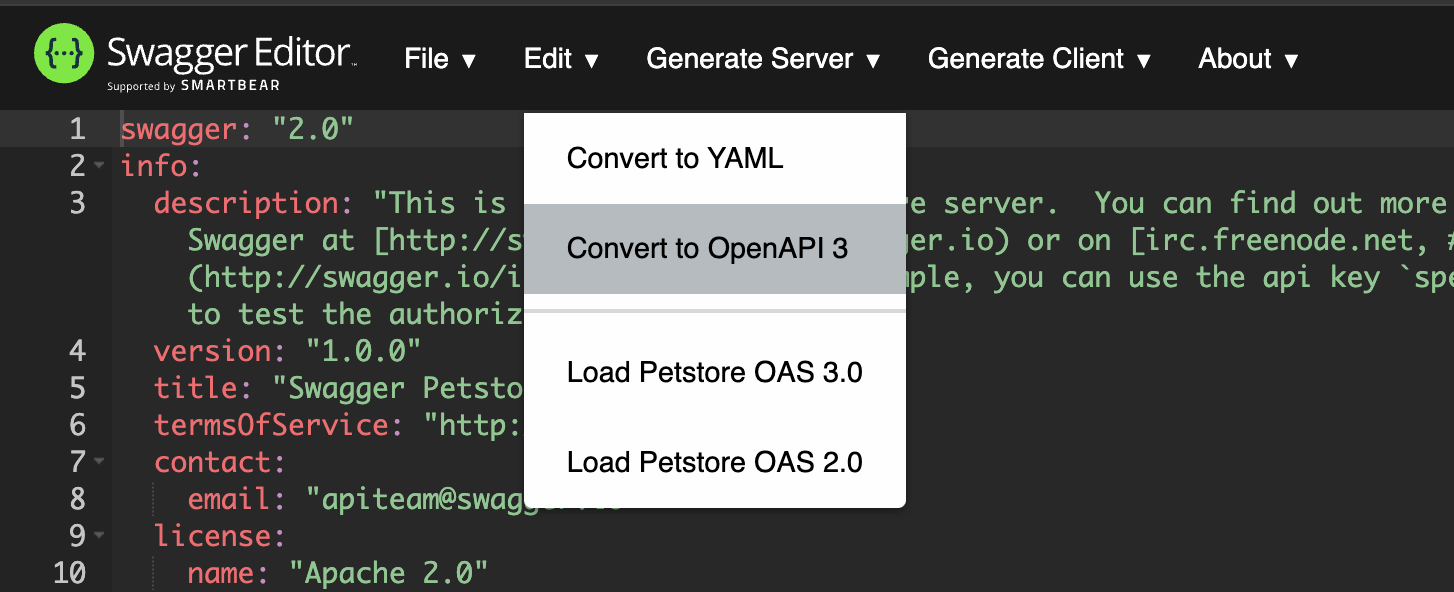
If the text box that appears below has a green border, your document has passed validation. This is the exact validation package Mintlify uses to validate OpenAPI documents, so if your document passes validation here, there’s a great chance the problem is elsewhere.Additionally, Mintlify does not support OpenAPI 2.0. If your document uses this version of the specification, you could encounter this issue. You can convert your document at editor.swagger.io (under Edit > Convert to OpenAPI 3):
Screenshot of the Swagger Editor with the Edit menu expanded and the "Convert to OpenAPI 3" menu item highlighted.
This is usually caused by a misspelled openapi field in the page metadata. Make sure the HTTP method and path match the HTTP method and path in the OpenAPI document exactly.Here’s an example of how things might go wrong:
get-user.mdx
---
openapi: "GET /users/{id}/"
---
openapi.yaml
paths:
  "/users/{id}":
    get: ...
Notice that the path in the openapi field has a trailing slash, whereas the path in the OpenAPI document does not.Another common issue is a misspelled filename. If you are specifying a particular OpenAPI document in the openapi field, ensure the filename is correct. For example, if you have two OpenAPI documents openapi/v1.json and openapi/v2.json, your metadata might look like this:
api-reference/v1/users/get-user.mdx
---
openapi: "v1 GET /users/{id}"
---
If you have a custom domain configured, this could be an issue with your reverse proxy. By default, requests made via the API Playground start with a POST request to the /_mintlify/api/request path on the docs site. If your reverse proxy is configured to only allow GET requests, then all of these requests will fail. To fix this, configure your reverse proxy to allow POST requests to the /_mintlify/api/request path.Alternatively, if your reverse proxy prevents you from accepting POST requests, you can configure Mintlify to send requests directly to your backend with the api.playground.proxy setting in the docs.json, as described in the settings documentation. When using this configuration, you will need to configure CORS on your server since requests will come directly from users’ browsers rather than through your proxy.
If you are using an OpenAPI navigation configuration, but the pages aren’t generating, check these common issues:
  1. Missing default OpenAPI spec: Ensure you have an openapi field set for the navigation element:
"navigation": {
  "groups": [
    {
      "group": "API reference",
      "openapi": "/path/to/openapi.json",
      "pages": [
        "GET /users",
        "POST /users"
      ]
    }
  ]
}
  1. OpenAPI spec inheritance: If using nested navigation, ensure child groups inherit the correct OpenAPI spec or specify their own.
  2. Validation issues: Use mint openapi-check <path-to-openapi-file> to verify your OpenAPI document is valid.
  1. Hidden operations: Operations marked with x-hidden: true in your OpenAPI spec won’t appear in auto-generated navigation.
  2. Invalid operations: Operations with validation errors in the OpenAPI spec may be skipped. Check your OpenAPI document for syntax errors.
  3. Manual vs automatic inclusion: If you reference any endpoints from an OpenAPI spec, only the explicitly referenced operations will appear in navigation. No other pages will be automatically added. This includes operations that are referenced in child navigation elements.
When combining OpenAPI operations with regular documentation pages in navigation:
  1. File conflicts: You cannot have both an MDX file and a navigation entry for the same operation. For example, if you have get-users.mdx, do not also include "GET /users" in your navigation. If you need to have a file that shares a name with an operation, use the x-mint extension for the endpoint to have the href point to a different location.
  2. Path resolution: Navigation entries that don’t match OpenAPI operations will be treated as file paths. Ensure your MDX files exist at the expected locations.
  3. Case sensitivity: OpenAPI operation matching is case-sensitive. Ensure HTTP methods are uppercase in navigation entries.

OpenAPI validation errors

When running mint openapi-check or mint dev, you may encounter validation errors that prevent your API documentation from generating correctly. This section explains common validation errors and how to fix them.

Understanding validation error messages

OpenAPI validation errors include a JSON path that shows exactly where the error occurred in your specification. The path uses forward slashes to indicate nested properties. Error format:
error Failed to validate OpenAPI schema: /path/to/operation/property: error message
Example:
error Failed to validate OpenAPI schema: /shot/get/responses/200: must have required property $ref
This error indicates:
  • Path: /shot (the endpoint path)
  • Method: get (the HTTP method)
  • Location: responses/200 (the 200 response definition)
  • Issue: Missing required $ref property

Response schema validation errors

Response objects in OpenAPI must follow specific rules. The most common issue is incorrectly defining response schemas.

Missing $ref in response

Error:
/users/get/responses/200: must have required property $ref
Incorrect:
{
  "paths": {
    "/users": {
      "get": {
        "responses": {
          "200": {
            "description": "Successful response",
            "type": "object",
            "properties": {
              "id": { "type": "string" },
              "name": { "type": "string" }
            }
          }
        }
      }
    }
  }
}
Correct:
{
  "paths": {
    "/users": {
      "get": {
        "responses": {
          "200": {
            "description": "Successful response",
            "content": {
              "application/json": {
                "schema": {
                  "type": "object",
                  "properties": {
                    "id": { "type": "string" },
                    "name": { "type": "string" }
                  }
                }
              }
            }
          }
        }
      }
    }
  }
}
Key differences:
  • Response schemas must be wrapped in contentapplication/jsonschema
  • Schema properties (type, properties) cannot be direct children of the response object
  • The description field is required for all response objects

Using $ref for reusable schemas

Correct with $ref:
{
  "paths": {
    "/users": {
      "get": {
        "responses": {
          "200": {
            "description": "Successful response",
            "content": {
              "application/json": {
                "schema": {
                  "$ref": "#/components/schemas/User"
                }
              }
            }
          }
        }
      }
    }
  },
  "components": {
    "schemas": {
      "User": {
        "type": "object",
        "properties": {
          "id": { "type": "string" },
          "name": { "type": "string" }
        }
      }
    }
  }
}

Common $ref errors

Invalid $ref path

Error:
/users/post/requestBody/content/application~1json/schema/$ref: can't resolve reference
Incorrect:
{
  "schema": {
    "$ref": "#/components/schema/User"
  }
}
Correct:
{
  "schema": {
    "$ref": "#/components/schemas/User"
  }
}
Common mistakes:
  • Using schema instead of schemas (note the plural)
  • Missing the #/ prefix
  • Referencing a component that doesn’t exist
  • Typos in the component name (case-sensitive)

External $ref not supported

Error:
External references are not supported
Incorrect:
{
  "schema": {
    "$ref": "https://example.com/schemas/user.json"
  }
}
Correct:
{
  "schema": {
    "$ref": "#/components/schemas/User"
  }
}
Mintlify only supports internal references within a single OpenAPI document. Move external schemas into your components.schemas section.

Circular $ref

Error:
Circular reference detected
This occurs when schemas reference each other in a loop. While some tools support circular references, they can cause issues. Restructure your schemas to avoid circular dependencies.

Request body validation errors

Missing content wrapper

Error:
/users/post/requestBody: must have required property content
Incorrect:
{
  "requestBody": {
    "description": "User object",
    "schema": {
      "$ref": "#/components/schemas/User"
    }
  }
}
Correct:
{
  "requestBody": {
    "description": "User object",
    "required": true,
    "content": {
      "application/json": {
        "schema": {
          "$ref": "#/components/schemas/User"
        }
      }
    }
  }
}

Parameter validation errors

Invalid parameter location

Error:
/users/get/parameters/0/in: must be equal to one of the allowed values
Incorrect:
{
  "parameters": [
    {
      "name": "userId",
      "in": "body",
      "schema": { "type": "string" }
    }
  ]
}
Correct:
{
  "parameters": [
    {
      "name": "userId",
      "in": "path",
      "required": true,
      "schema": { "type": "string" }
    }
  ]
}
Valid in values: query, header, path, cookie. Note that body is not valid for parameters in OpenAPI 3.0+. Use requestBody instead.

Troubleshooting workflow

When mint openapi-check fails with validation errors, follow this workflow:
1

Run validation

mint openapi-check <path-to-openapi-file>
This command validates your OpenAPI specification and shows all errors.
2

Identify the error location

Parse the JSON path in the error message to locate the exact operation and property:
/users/{id}/get/responses/200/content/application~1json/schema
  • Path: /users/{id}
  • Method: get
  • Location: responses200contentapplication/jsonschema
Note: ~1 in the path represents a forward slash (/) that’s been escaped.
3

Check the OpenAPI specification

4

Validate with external tools

Use the Swagger Editor to validate and debug:
  1. Visit editor.swagger.io
  2. Click “Validate text” tab
  3. Paste your OpenAPI document
  4. Click “Validate it!”
A green border indicates successful validation. The Swagger Editor uses the same validation package as Mintlify.
5

Fix and re-validate

After making corrections, run mint openapi-check again to verify all errors are resolved.

Additional resources